
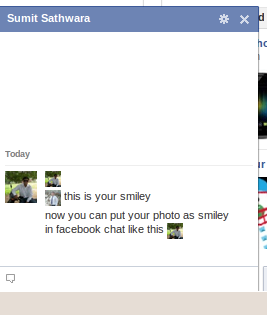
Here’s amazing trick to use your profile photo or anyone else’s profile photo as a smiley in Facebook chat. This way you can express yourself better with any page/person’s profile picture. Its fast, easy and simple and you do not have to install anything. You just need to follow the steps shown below:
This is image representation done for the demonstration purposes
Step-1 :
Go to any profile, page or any group whose emoticon you want to use.
Step-2 :
Look at the url in the address bar. You can find the username or the profile ID something like “chintakdholakia” from http://www.facebook.com/chintakdholakia, or like from other pages or profiles as “dailystufforg”, “sumit.sathwara″, “5597362282″ . etc
Step-3 :
Now put that username or profile id in the two square brackets like [[chintakdholakia]]
Step-4 :
As easy as that! Next is what, you just have to paste that in the Facebook chat or message text area. And when you hit enter and send it, whose ID number or the username that you gave that persons, page’s or the group’s profile picture will appear.
Few more Facebook chat emoticons which can be used are:
- Pirate – [[CaptainJackSparrow]]
- Boyishness – [[JustinBieber]]
- Santa Claus – [[TheMagicOfSantaClaus]]
- Disapproval – Fry from Futurama [[[278104690058]]
- Adventure, auto theft – [[VinDiesel]]
- Badass – (Chuck Norris) [[46637413257]]
- Santa Claus - [[TheMagicOfSantaClaus]]
- Okay – [[100002752520227]]
- Poker Face – [[129627277060203]]
- Not Bad – [[169919399735055]]
- LoL – [[189637151067601]]
Hope you like the trick 






No comments yet.