

Generally, we send the emails as soon as we finish writing but some emails especially newsletters, birthday and other occasional wishes on emails, or just if you want to schedule your email in Gmail.com , here’s a wonderful trick to do so.
Initial Step: Downloading and Installing
Boomerang for Gmail is application that can be installed in Chrome, Firefox or Opera browsers. If you are feeling lazy to search, Click here so that DailyStuff.org will search for you or visit their website: www.boomeranggmail.com
Install the application and then go to Gmail.com to see Boomerang’s presence.
Where to Find Boomerang in Gmail?
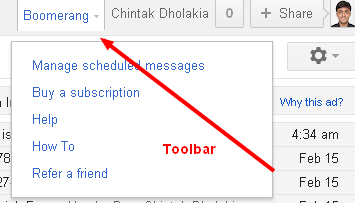
You will see the Boomerang toolbar next to your name in Gmail.com just above the Inbox. Here, you can manage the scheduled Emails you sent in-case you want to reschedule, cancel email or send it immediately. This service is free but premium versions also available. In Free service, you can schedule 10 Emails per month. The comparison chart for various services:
Basic |
Personal |
Professional |
|
| Price | Free | $4.99/month | $14.99/month |
| Sign Up | Sign Up | ||
| Message Credits | 10 per month | Unlimited | Unlimited |
| Supported Accounts | Gmail or Google Apps | Gmail | Gmail or Google Apps |
| Send Later |  |
|
|
| Boomerang Reminders | |
|
|
| Response Tracking ? | |
|
|
| Notes ? | |
|
|
| Boomerang Mobile ? | |
||
| Recurring Messages ? | |
How to Schedule Email?
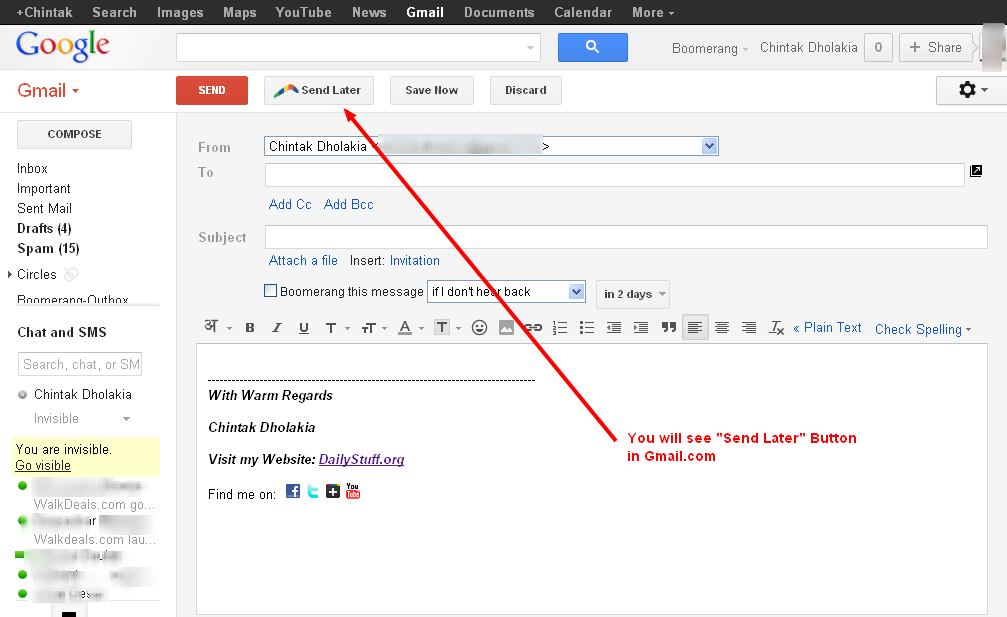
Once you compose your Email, you will have to click on “Send Later” button instead of “Send” button. As you click on it, it will look like this:
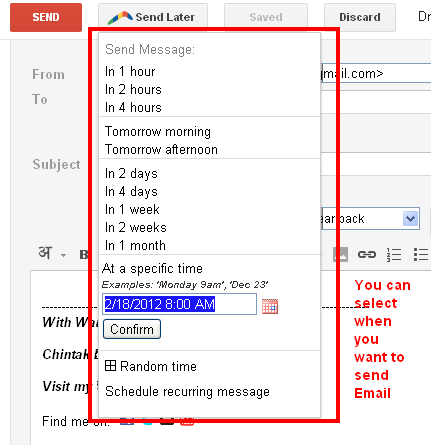
Once you define the time and schedule it, press “Confirm” and the task is over 
It Also Reminds you to follow up Emails:

There are times you need to make sure you follow up within a specific time frame after sending a message. You can select to only be reminded if nobody replies, or regardless. This way you won’t let messages slip through the crack and will never forget to follow up with people.
Boomerang on your Mobile:
Just Visit: http://m.boomeranggmail.com and you can access it services from your mobile only.




[...] Here’s a tutorial on how to enable Emoji in Gmail: [...]